
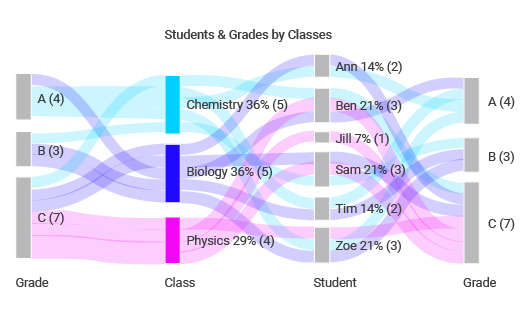
Sankey charts are some of the most popular data visualization tools available on the web. Given that there are large volumes of data generated everyday, there is a need to convert the data into insights. According to the research report delivered within the past few months, an average person generates approximately 1.7 mbs of data. This data is expected to increase as the technology sector continues to develop.
When dealing with technical data, you need to have proper tools that will analyze the data and unmask the underlying information. Sankey charts also known as Sankey diagrams are designed to depict the flow of data points from one point to the other. For instance, you can use a Sankey chart to showcase resources such as money, energy, or time moves throughout the process.
Also, the Sankey diagram can be used to showcase the decision tree. When you want to visually showcase a complex process, a Sankey diagram can greatly help you get the job done. Given that a Sankey chart plays a critical role in data visualization, the technical part remaining is how to create the chart. Luckily, there are multiple tools to create a Sankey chart that you can adopt and use.
This content piece elaborates more about Sankey charts and some of the tools that you can use to create a Sankey diagram. Read this blog for more information!
What is a Sankey Diagram?
A Sankey chart was invented by an Irish Engineer known as Mathew Henry Sankey. The chart was first invented to display the energy efficiency of a stream engine. Currently, the diagram is used to showcase the flow of substances from different points.
Creating a Sankey chart is easier when you have the right website. Let’s check out some of the websites that can help you make the chart.
Websites Used to Create Sankey Charts
Given that you need some coding knowledge to create a Sankey chart, it can be difficult if you haven’t learnt programming. However, this doesn’t mean that you cannot create a Sankey chart if you haven’t learnt coding. Below are some of the websites that can help you create a Sankey diagram without calling for coding knowledge.
- Displayr
Displayr is one of the most popular tools for creating a Sankey chart. The tool comes with a wide array of features that enables you to create an outstanding Sankey chart during data visualization. To use Displayr, you need to sign up for an account before you get started. Once you are logged in, you will get access to a powerful user interface where you can upload your data.
The data you upload in the tool can be from your computer or export directly from the cloud. After uploading your data, you can now choose to use the automated Sankey chart layout or do it by yourself. Apart from the Sankey chart, Displayr gives you the freedom to create any chart of your desire.
- ChartExpo
Are you looking for an advanced tool to create a Sankey chart that resonates your needs? ChartExpo offers you with all the features you need to visualize your data with just a few clicks. This tool is designed to simplify your work since you don’t necessarily have to learn how to code. ChartExpo has a friendly user interface that is simple to learn how it works.
You can download the tool from the Microsoft store and sign up for an account. You will then be given a seven days free trial to assess the functionality of the tool before paying the monthly subscription fees. It also offers other charting tools that you need during data visualization. Note that ChartExpo is an add-on used on Microsoft Excel and Google Sheets.
- Chartguide
Chartguide is one of the primary tools you can use to create a Sankey chart. However, this tool is designed to work one on one with Microsoft Excel. In order to use this tool, you need to get access to Excel and use Chartguide as an add-on when creating a Sankey chart. This means you need to upload your data on a spreadsheet to access the tool.
Once you paste your data into Excel, you can now access the tool, which will take over the remaining responsibility. Chartguide completes the remaining work on your behalf since it’s programmed to compose Sankey charts based on the data you upload.
- Google Charts
Google Charts is another popular option that data analysts can utilize when creating a Sankey chart. Note that this is one of the free tools available on the web that you can easily acquire and use. The tool gives you control over the entire creation process since you have the freedom to choose your preferred color levels and label them accordingly.
When using Google charts, you can enjoy a user-friendly dashboard that is easy to interpret. The tool is designed in a simple and straightforward manner that makes it simple to learn and use.
- Highcharts
When you want to create and edit your Sankey chart, Highcharts is the most appropriate option to use. The tool portrays an incredible dashboard that helps you throughout the entire process. Apart from the preview option, you can as well copy the code directly and create a chart that reciprocates their personal needs.
In addition, highchairs give you access to a wide variety of charting options and features that aid in completing your work. Also, it offers charting options in different languages, making it a more diversified charting tool.
- SankeyMATIC
SankeyMATIC is one of the tools that allows you to add your preferred data inputs to customize the Sankey chart. Once you are done with the process, you can export the final output as a PNG image or a vector code. The mode in which you choose to export the final chart mainly depends on your personal preference.
The data input methodology is pretty simple to understand, thus making it easier to create the chart. The vector code works well when you want to import your chart into a particular program.
- R Graph Gallery
The R graph gallery is a wide market where you can find more than four hundred different charting types. R is considered a software environment that is mostly used for statistical computing. The statistical aspect makes it a better option for creating a Sankey chart. The tool uses NetworkD3, which is also an HTML widget that is used for building interactive widgets.
You can find your most preferred graph on R, provided that you get access to the marketplace.
- Sankey Diagram Generator
Just like the name suggests, the Sankey diagram generator is a special tool used to create Sankey charts. The tool allows you to upload data in different formats. This includes pivot tables, JSON, and CSV. When using the Sankey diagram generator, you need to adjust the color and size of every flow to make it reciprocate your needs.
Once you click on the save button, the website generates a code that you can copy and paste. Also, you can choose to download the tool or share the tool via email.
- Python Graph Gallery
If R is not your thing, you can give Python a trial. The python graph gallery offers everything you need to create a Sankey diagram. In addition, the website offers a wide array of charting options that you can utilize to create your preferred data visualization tool. It also gives you directives on how to compose the chart.
When you find it challenging to use the website, you can choose to look at the examples to help you understand how the process is carried out.
- Visual Paradigm Online Sankey Diagram Maker
If you are looking for a Sankey diagram maker that is packed with lots of features, the visual paradigm has your back covered. The tool comes with templates that offer guidance on how to create your Sankey chart with a lot of ease. Besides, you can change the font styles, size, and icons to ensure that everything suits your preferred needs.
Bottom Line
A Sankey chart is one of the most advanced charting options available on the web. The tool gives data analysts different points of viewing the data. By offering different angles to view the data, it helps you to uncover detailed insights that you cannot unmask with bare eyes. When you want to transform your data into simple visuals that are easy to understand, the Sankey chart can help you achieve your goal.
With a Sankey chart generator, you can compose with just a few clicks. The only thing you need to work on is to ensure that you are dealing with accurate data values to enhance the accuracy of the final results.
